Reminders and delivery activity
Set automatic reminders
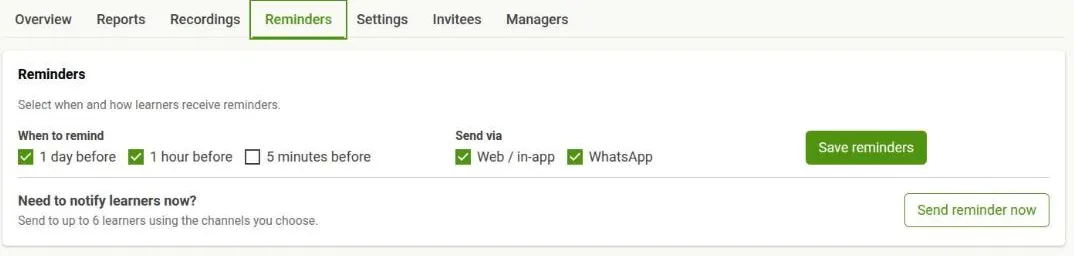
Section titled “Set automatic reminders”In a class’s Reminders tab, choose When to remind and Send via, then save. Both lists are controlled by the platform team, so you only see the timings and channels they have enabled. If no timings appear at all, the platform administrator has not enabled any.
Send one now
Section titled “Send one now”Send reminder now is available when manual reminders are enabled, the class has a future occurrence, at least one allowed channel is selected, and the minimum wait since the last manual send has passed. For a recurring series, choose which occurrence the reminder is about.
After you send it, the reminder appears in Delivery activity with the same status information as an automatic reminder.
What learners are notified about
Section titled “What learners are notified about”Reminders you choose are only part of it. The platform also notifies learners when the class itself changes. Delivery activity labels each of these:
| Event | When it happens |
|---|---|
| Session scheduled | The class was created |
| Session rescheduled | You moved an occurrence |
| Session cancelled | You cancelled the class or an occurrence |
| Scheduled | One of the reminder timings you chose came due |
| Starting now | The class is beginning |
| Manual reminder | You used Send reminder now |
| Host reminder / Host starting now | The same, addressed to the host rather than learners |
These updates are created automatically when the class changes.
Delivery activity
Section titled “Delivery activity”Each row is one event across all its recipients, with the time of the last activity and a count per outcome. Counts that need attention — failed and skipped — are called out separately from the rest. Filter by event, occurrence or status to narrow a busy list.
Select an event to see Delivery details: one recipient per row with the result for every channel.
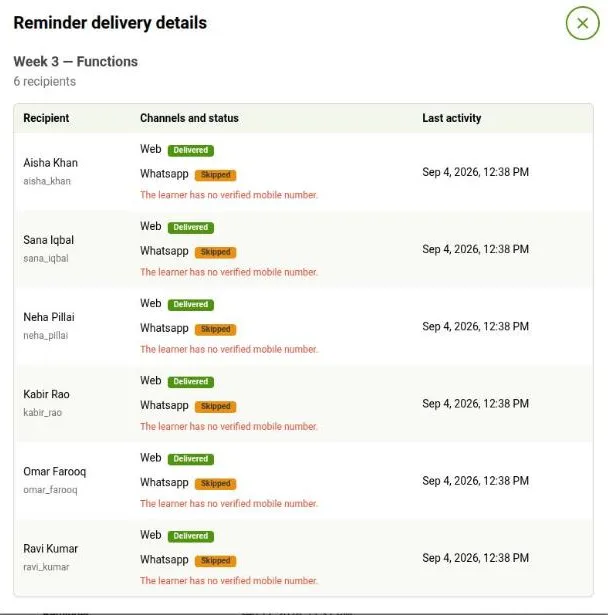
Common states are:
- Scheduled — waiting for its send time
- Sent — passed to the selected notification service
- Delivered — confirmed as delivered
- Skipped — the learner was not eligible for that channel
- Failed — the provider rejected the attempt or an error occurred
A skipped or failed channel does not stop the other selected channels. A skipped result usually means that a learner has not enabled that channel or is missing the required contact information.
If nothing is listed yet, no notification has been created for this class so far.